Creating new organisations is temporarily paused. We are fine-tuning the app with the first businesses. Write to us at hello@smallbuss.online and we will gladly set up a test organisation for you.

SThe modular platform for small businesses

Your business.
All aboard.

Orders, customers, finance, shipping and tools for your trade, all on one line. Start with the basics and add more stops whenever you need them.

TTradeSSalesFFinancePlatformteam and customersCeramicsclays, glazes, firingsDesign studiocoming soonYour tradephotographer, builder…Catalogueproducts and pricesOrderswho ordered whatShippingvia PacketaE-shopvia APIInvoicingalso via KROSCosts and revenuescosts and receiptsFinance overviewwhat your work earns Platformteam and customersCeramicsfirings and glazesDesign studiocoming soonYour tradephotographer, builder…Catalogueproducts and pricesOrderswho ordered whatShippingvia PacketaE-shopvia APIInvoicingalso via KROSCosts and revenuescosts and receiptsFinance overviewwhat your work earns
Sales line Trade and finance Coming soon More trades
How it works

You pick the route.
We lay the tracks.

smallbuss is not one big system you have to learn all at once. Every module is a stop, you only pay for the ones where you get off, and you choose the order yourself.

1

Start with your craft

Before you sell anything, you make it. The module for your field, such as the upcoming Ceramics, keeps clays, glazes, tests and firings in one place.

CeramicsDesign studio+ your trade
2

Board the Sales line

When the first customers arrive, switch on Catalogue and Orders and send parcels through Packeta. No more searching for orders in notes and Instagram messages.

CatalogueOrdersShipping
3

Add finance

Invoices, also through KROS, costs and revenues. With income and expenses in one place, the Finance overview shows what your work really earns.

InvoicingCosts and revenues
4

Sell online

When your business grows into its own e-shop, connect it to Catalogue and Orders and orders from the web will come in by themselves.

E-shop · planned
The app

An overview you get in five seconds.

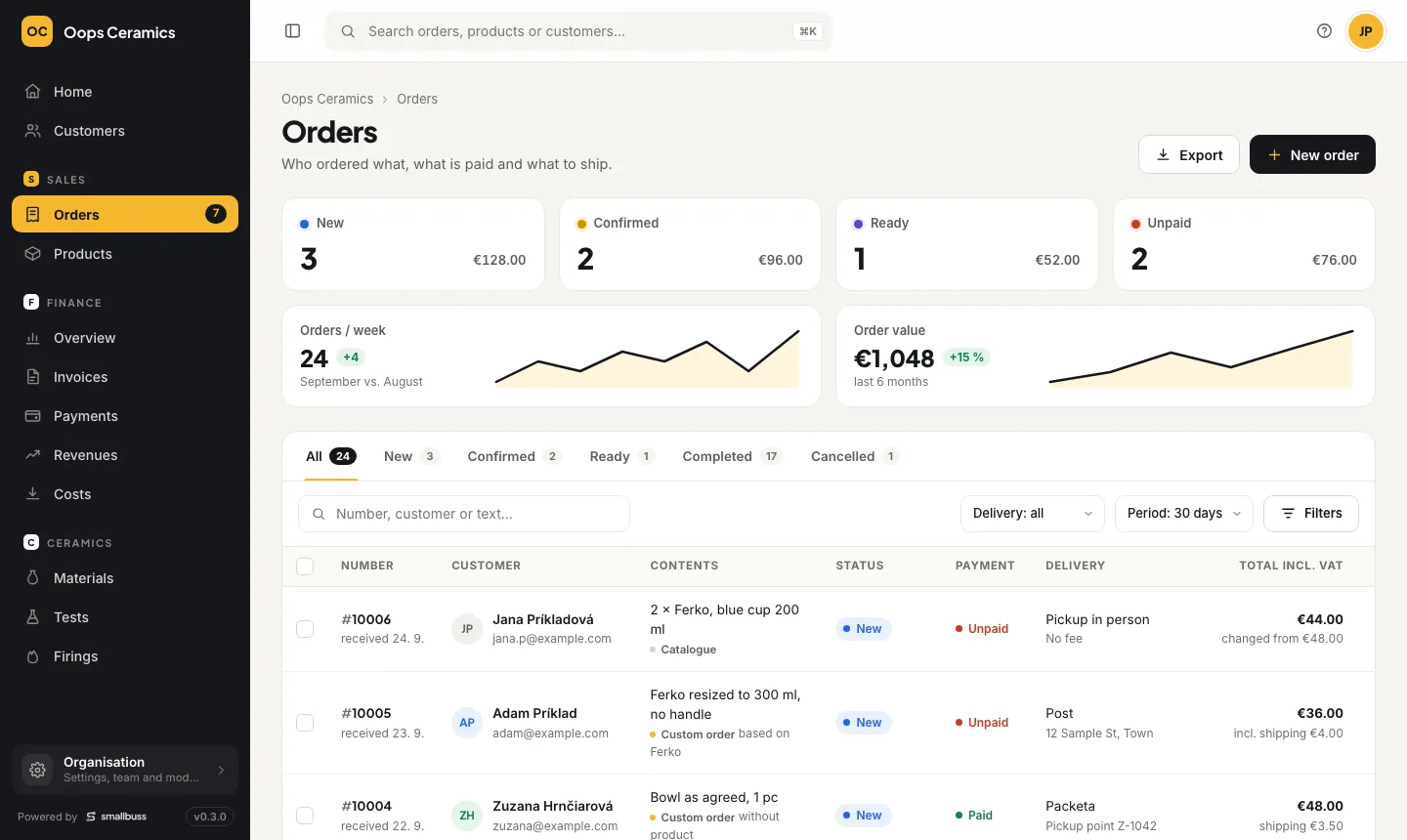
What is new, what to make, what is paid and what to ship. See the status of every order at a glance and move it on with one click.

App preview: the order overview with status, payment and delivery
Status at a glance

New, confirmed, ready, completed. No more spreadsheets.

Payments matched to orders

Match a payment to its order by the payment reference.

Invoice from the order

Issue the invoice straight from the order, in smallbuss or through KROS.

Work as a team

Invite colleagues and everyone sees just what they need.

Integrations

Connected to the tools
you already use.

smallbuss does not replace your accounting or your carrier. It connects them to your orders, so you do not have to retype the same details in several places.

KROSKROS Fakturácia · Invoicing module
In evaluation

Invoices issued right in KROS

Prepare the invoice in smallbuss, from an order or on its own. KROS assigns its number and payment reference, the document stays in your KROS records and its PDF comes back to smallbuss.

  1. Order
  2. Invoice
  3. KROS
  4. PDF in smallbuss
  • Connect by signing in to KROS and approving access.
  • Numbering stays in KROS; smallbuss keeps no second sequence.
  • See the document status right away, and the reason if KROS rejects it.

Requires your own KROS Fakturácia account with API access.

PacketaPacketa · Shipping module
In evaluation

Parcels through Packeta

Pick the pickup point or Z-BOX on a map right in the order. When the order is ready, the parcel is created in your Packeta account and you print the label with one click.

  1. Pickup point
  2. Parcel
  3. Label
  4. Delivered
  • Pickup points and Z-BOXes in Slovakia and Czechia.
  • Print labels one by one or in bulk into a single PDF.
  • A delivered parcel completes the order by itself, and smallbuss flags parcels on their way back.

Requires your own Packeta account and the Orders module.

More connections, such as linking an e-shop through an API, are on the way.

AI assistant

Say what you need.
Your AI assistant does it.

Everything you click through in smallbuss, your AI assistant, Claude for example, can do for you. Nothing to learn and no programming: tell it in plain words what you need and it records it in smallbuss for you.

  • Orders, invoices, payments, costs and parcelsIt records an order from an e-mail, issues an invoice, matches a payment, finds a Packeta pickup point or sums up how your month went.
  • Never more than you can doThe assistant has at most your permissions, and for each key you decide which modules it reaches and whether it may only read.
  • Connected in a minute, disconnected in one clickCreate a key in your profile, paste it into your assistant and revoke it whenever you like.
Connect your AI assistant

Managing your team and organisation settings stays with people. Technically, the assistant connects through the smallbuss MCP server with your personal key.

Modules

A module is a stop.
A bundle is a line.

Switch on only the modules you need. If a module needs another one, the app offers to switch that on too. The other modules complement each other: with both switched on, links between them appear. Modules marked In evaluation are finished and the first businesses now use them in daily work.

★

Platform

Always on

The depot every line starts from. Every organisation has it.

  • Organisation, team and roles
  • Customers in a shared directory
  • Home, search, export, guide and AI assistant
Nothing to switch on, it is always there.
Details · Platform
S

Orders

In evaluation

Who ordered what, what is paid and what to ship.

  • Status, due dates and delivery
  • Payment matched by reference
  • Order brief with a description, links and images
Works with: Catalogue, Shipping, Invoicing
Details · Orders
S

Catalogue

In evaluation

The products and prices you offer.

  • Products in categories
  • Photos, prices and weight
  • Ready-to-sell status
Works with: Orders, E-shop
Details · Catalogue
S

Shipping

In evaluation

Parcels through Packeta, right on your orders.

  • Pickup point or Z-BOX on a map
  • Labels one by one or in bulk
  • Parcel tracking
Requires: Orders
Details · Shipping
S

E-shop

Planned

The end of the Sales line for those who sell online.

  • Connect your e-shop through an API
  • Orders straight into smallbuss
Requires: Catalogue and Orders · we recommend Invoicing
Details · E-shop
F

Invoicing

In evaluation

Invoices from orders or on their own, for example for services.

  • Invoices and credit notes
  • Payments and cash box
  • Issuing through KROS Fakturácia
Works with: Orders
Details · Invoicing
F

Costs and revenues

In evaluation

Expenses, receipts and revenues in one place.

  • Receipts and supplier invoices by category
  • Revenues from orders and invoices
  • Finance overview
Works with: Orders, Invoicing
Details · Costs and revenues
C

Ceramics

Coming soon

For ceramic studios and potteries. One module with everything together.

  • Clays and glazes
  • Tests and experiments
  • Firings and batches
Works with: Catalogue, Orders
Details · Ceramics
D

Design studio

Planned

For graphic designers and studios working on commission.

  • Jobs and hand-over
Works with: Orders, Invoicing
+

Your trade

A photographer, a small builder, a tailor? Tell us which stop you are missing. We add new trades based on demand.

Suggest a trade
Who it's for

For small teams doing big things.

For a one-person shop or a small team. For those who sell products and for those who do commissions and services.

Ceramic studios

Orders from Instagram, custom pieces, glazes and firings.

Design studios

Quotes, jobs and invoices for graphic designers and studios.

Photographers

Shoots, deposits and delivering photos to clients in one place.

Small builders

Jobs, materials and costs for every site.

First stop

oops. ceramics was first on board.

A small studio making handmade ceramics. Orders came in through Instagram and ended up in phone notes. With smallbuss every order has its place, its status and its payment.

Ordersinstead of notes
Cataloguemugs, bowls, vases
Ceramicsthe next stop
Pricing

Pricing is coming soon.

The modules are in evaluation with the first businesses. We will publish prices soon and the principle stays: pay only for the stops you use, with no lock-in.

SStart

Coming soon
  • Platform with team and customers
  • Orders module
  • Works on your phone
Request access

CCeramic studio bundle

Coming soon
  • Orders and Catalogue
  • Ceramics module
  • The whole line in one bundle
Request access

+Each extra module

Coming soon
  • Add it any time
  • Switch it off with no penalty
  • See dependencies up front
See the modules

All finished modules are free during the evaluation. We will announce charges at least 30 days in advance.

Questions

Before you board.

How do I get into smallbuss?

Creating new organisations is temporarily paused while we fine-tune the app with the first businesses. Write to us at hello@smallbuss.online, we will set up a test organisation for you and send you an invitation by e-mail.

Do I pay for modules I don't use?

No. The platform is for everyone and other modules are switched on only when you need them. We will publish exact prices once the evaluation ends.

Do I need a programmer to connect KROS or Packeta?

No. You connect KROS in the invoicing settings by signing in to your KROS account. You connect Packeta in the shipping settings with the access details from the Packeta client section. Both connections are set up by the organisation's Owner.

I run an e-shop. Do I need Invoicing too?

No, we only recommend it. You can issue invoices elsewhere, for example in your e-shop platform, and simply record them in smallbuss.

Does it work on my phone?

Yes. smallbuss runs in the browser on your computer and phone, with nothing to install.

Do I need technical skills for the AI assistant?

No. Create a key in your smallbuss profile, copy it together with the address into your AI assistant and from then on simply tell it in plain words what to do.

Is my data kept apart from other businesses?

Yes. Every organisation's data is strictly separated and only its members can access it.

Can I work with a colleague?

Yes. Invite them by e-mail and decide what they can do in your organisation.

Your business is the next stop.

Creating organisations is temporarily paused. We will set up a test organisation for you on request.

hello@smallbuss.online